Guide
EZO Connection
This page explains the out-of-the-box EZO connection profile in ABM Warranty. This is specifically for the prebuilt EZO profile, not the Builder profile. The EZO profile is designed to reduce setup complexity by providing predefined endpoint behavior and default mapping expectations for the ABM warranty fields used by outbound sync.
Purpose
The EZO profile defines a known outbound integration contract for EZOfficeInventory. It lets you authenticate once, validate the connection, and then focus on mapping review and sync behavior. You are not required to manually design every endpoint contract in the way Builder requires.
Scope
The EZO profile supports outbound sync of ABM warranty-related values to EZO asset records and uses serial number as the record matching key. The profile includes expected destination field names and endpoint patterns suitable for EZO API workflows.
EZO Connection Wizard Flow
Step 1: Connection Basics + API Key Details
Enter friendly name, base URL, API key, API key header name, and optional API key prefix. Required fields are validated before continuing.
Step 2: Connection Validation (Not Shown)
The wizard validates authentication and confirms the profile can communicate with destination APIs. For EZO profile flows, this step is intended to be deterministic: when validation succeeds, the flow advances to mapping review instead of requiring manual contract design. This step is typically shown by a progress spinner and authenticates very fast assuming your information is correct; if not, it returns to Step 1.
Step 3: Field Mapping Review
You review ABM source fields, destination field selections, destination sample values, and action rules. This is where you confirm update behavior prior to save.
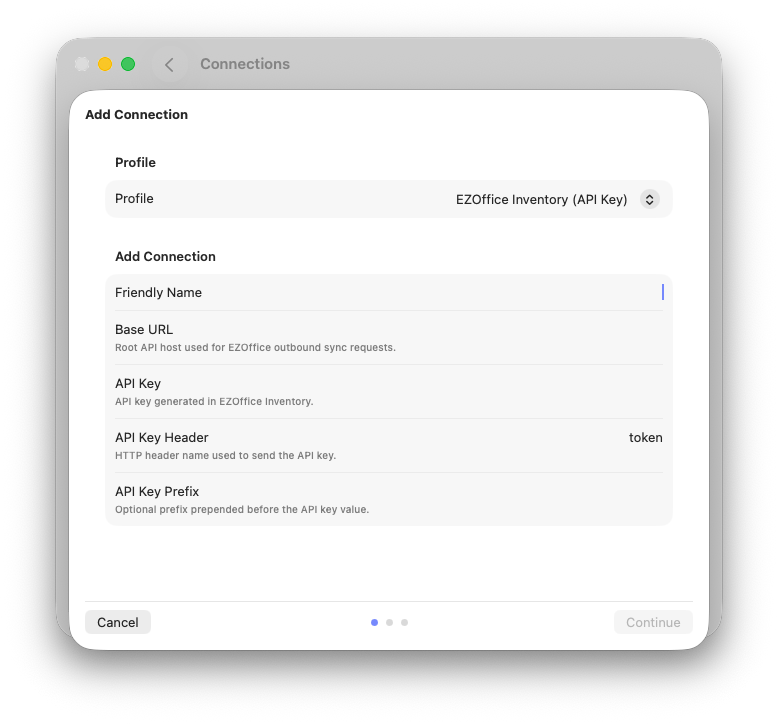
Enter the information into the EZO API Connection Wizard.
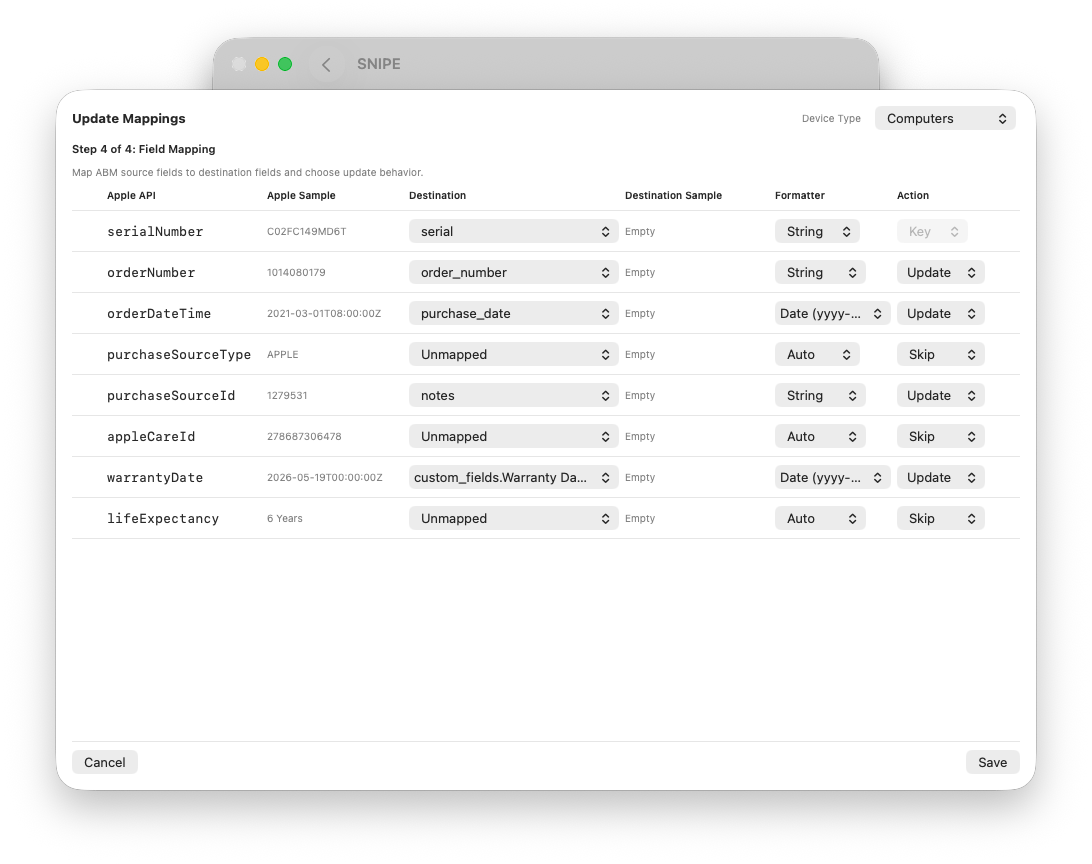
Update mapping fields for warranty and purchasing data.
Understanding Mapping in EZO Profile
Key Matching Field
Serial number is the lookup key used to find destination records. This key should not be mapped as a field to overwrite destination identity. It is used for matching.
Default Warranty Field Set
Current warranty mapping surfaces these core ABM fields:
serialNumberorderNumberorderDateTimepurchaseSourceTypepurchaseSourceIdappleCareIdwarrantyDatelifeExpectancy
Action Rules
Per-field action controls define behavior:
- Update: field is eligible for outbound update.
- Skip: field is never updated by outbound sync.
- Key: identity/match behavior (used for serial matching context).
Even when action is Update, sync logic may still skip a field when source and destination values are already equivalent after normalization.
How to Update Mappings Later
- Settings → Connections.
- Select the EZO connection row.
- Choose Update Mapping.
Profile Scope Behavior
For the direct EZO profile, mapping is a straight API profile path and does not expose a Computers/Mobile Devices scope selector in the mapping surface. Review and save mappings in the single profile mapping view provided.
Confirm Destination Samples
Destination sample values are used for operator confidence while mapping. If samples are empty, validate API auth, profile contract behavior, and serial lookup viability before concluding mapping is incorrect.