Guide
CLI Managing Notifications
The notifications command group controls local warranty-notification behavior for ABM Warranty and its login-item helper. This page breaks each command into practical examples so you can see expected output and understand exactly what each command changes.
Notifications Help
Use the notifications help command to view the full command surface, available subcommands, and example usage for day-to-day operations.
abm-warranty notifications --help
ABM Warranty Notifications CLI
OVERVIEW
Configure and inspect local warranty-notification behavior used by the app
and login-item helper.
USAGE
abm-warranty notifications This output confirms that notifications are managed locally, with dedicated commands for state inspection, enable/disable actions, cadence changes, and diagnostic testing.
Get Notification Status
Use status to quickly verify whether notifications are enabled,
which cadence is active, and whether the helper registration is in place.
abm-warranty notifications status
notifications: enabled=true frequency=daily helper=enabled
In this example, notifications are currently active, running on a daily cadence, and the helper is registered.
Enable Notifications
Use enable to turn notifications on and ensure the helper is
registered for notification delivery workflows.
abm-warranty notifications enable
notifications: enabled helper=enabled
The command reports that notifications are enabled and helper registration is active.
Set Notification Frequency
Use frequency to set notification cadence for dedupe windows and
recurrence behavior.
abm-warranty notifications frequency 3days
notifications: frequency set to every3Days
This updates cadence to once every 72 hours per device/category.
Run Diagnostic Snapshot
Use run-once to inspect settings and snapshot-derived candidate
counts without changing device data.
abm-warranty notifications run-once
notifications: diagnostic run-once
enabled=true frequency=every3Days helper=enabled
snapshot tenant=BUSINESSAPI.881d1725-a1a3-4229-87f3-b1ea8cae7440 hasData=true needsAttention=0 expiringSoon=0
This confirms current runtime settings and reports what the snapshot contains for notification candidates, without mutating stored records.
Post a Test Notification
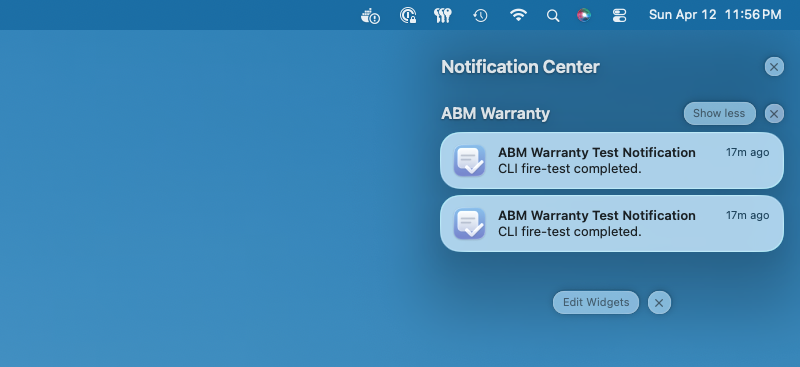
Use fire-test to immediately post a local test notification and
confirm that delivery is functioning end-to-end.
abm-warranty notifications fire-test
notifications: fire-test posted
This indicates the test notification request was successfully posted.
Post a Verbose Test Notification
Use fire-test --verbose when you need step-level diagnostic
visibility for permission status, queueing, and delivery counts.
abm-warranty notifications fire-test --verbose
notifications: fire-test starting
notifications: fire-test authStatus=2
notifications: fire-test queued id=warranty.fire-test.E805C534-BACE-44FB-84C0-B37881BCEF1D
notifications: fire-test deliveredCount=2
notifications: fire-test posted
Verbose mode is useful for troubleshooting because it exposes each stage of test notification processing.