Guide
Enhanced Detail View
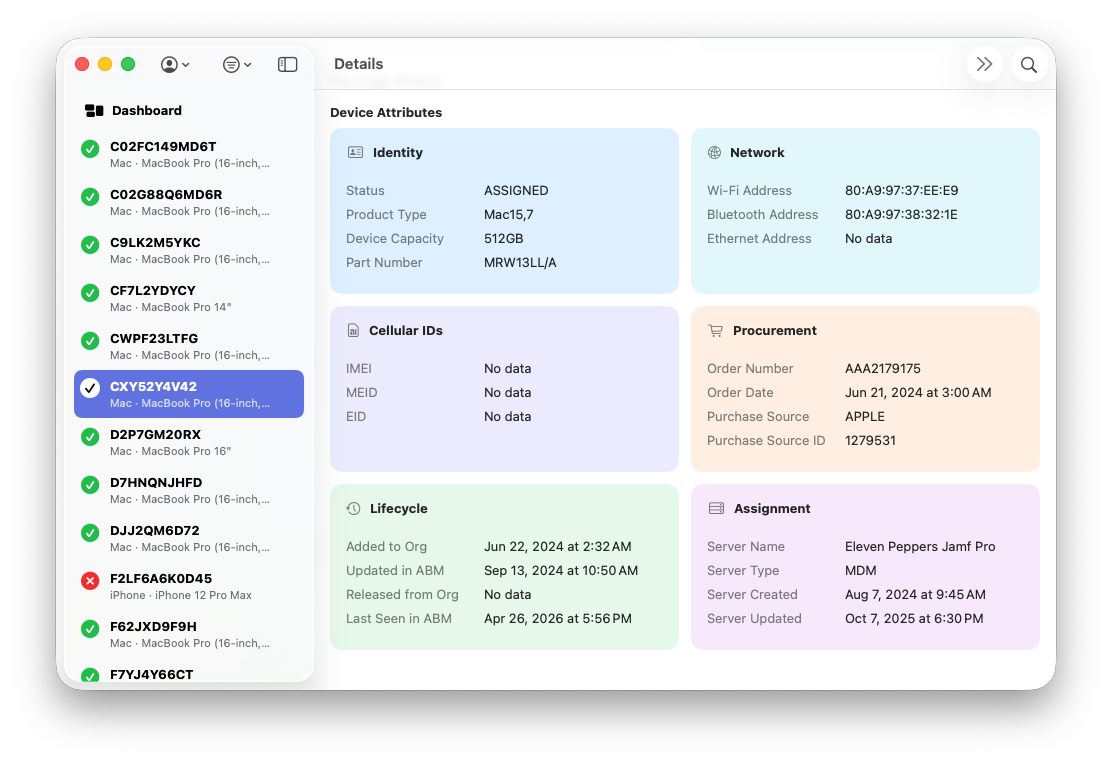
The Enhanced Detail View is the expanded per-device experience that combines coverage history with richer Apple Business attribute data in visual cards. It is designed to make troubleshooting, validation, and data review faster without leaving the device context.
Where to Access It
- Open the main device list in Dashboard.
- Select any device row.
- Use the right-side detail panel to review warranty cards, coverage history, and Device Attributes.
Top Sections in Detail View
Warranty Summary Cards
The top summary cards show Standard Warranty and AppleCare+ windows with start and end dates, plus current status indicators. This gives a quick operational view before drilling into individual attributes.
Coverage History
Coverage History shows prior coverage records with start, end, and status details. Use this timeline to compare current coverage against historical windows and validate lifecycle transitions.
Device Attributes (Visual Buckets)
Below coverage sections, ABM attributes are grouped into themed cards so related data stays together. This reduces scan overhead and helps operators quickly isolate the category that matters for the issue they are investigating.
| Card Bucket | Typical Fields | Purpose |
|---|---|---|
| Identity | Status, Product Type, Device Capacity, Part Number | Hardware identity and high-level state context |
| Network | Wi-Fi Address, Bluetooth Address, Ethernet Address | Network hardware identifiers and connectivity validation |
| Cellular IDs | IMEI, MEID, EID | Cellular enrollment and inventory correlation |
| Procurement | Order Number, Order Date, Purchase Source, Purchase Source ID | Purchase and lifecycle sourcing context |
| Lifecycle | Added to Org, Updated in ABM, Released from Org, Last Seen in ABM | Timeline and freshness signals from ABM inventory metadata |
| Assignment | Server Name, Server Type, Server Created, Server Updated | Assigned server relationship and management routing |
Data Source Notes
ABM API and Local Persistence
These values originate from Apple Business API responses and are persisted in the active tenant database. The detail panel renders those persisted values for the selected tenant and device context.
Display Formatting
- Address fields are formatted for readability.
- Date and time values are rendered in human-readable UI formats.
- Empty or missing values are shown as explicit no-data placeholders.
Why It Matters Operationally
| Use Case | How Enhanced Detail Helps |
|---|---|
| Warranty validation | Compare summary windows and historical records in one place. |
| Mapping validation | Cross-check ABM source fields before outbound mapping or sync testing. |
| Data quality review | Identify missing identifiers or stale lifecycle timestamps quickly. |
| Troubleshooting | Use grouped fields to isolate network, procurement, assignment, or lifecycle issues. |
Relationship to CSV Export
Most fields shown in Enhanced Detail View are also available in CSV export. Use CSV for fleet-level reporting and trend analysis across many devices.
Use Enhanced Detail View when you need per-device diagnosis, context-rich review, and faster field-by-field validation in one panel.