
rodchristiansen / asbmutil
asbmutil
asbmutil by Rod Christiansen
A swift app and asbmutil CLI for Apple School and Business Manager APIs to get device info, assign or unassign MDM servers, and resolve device-to-s...
Read postBlog category
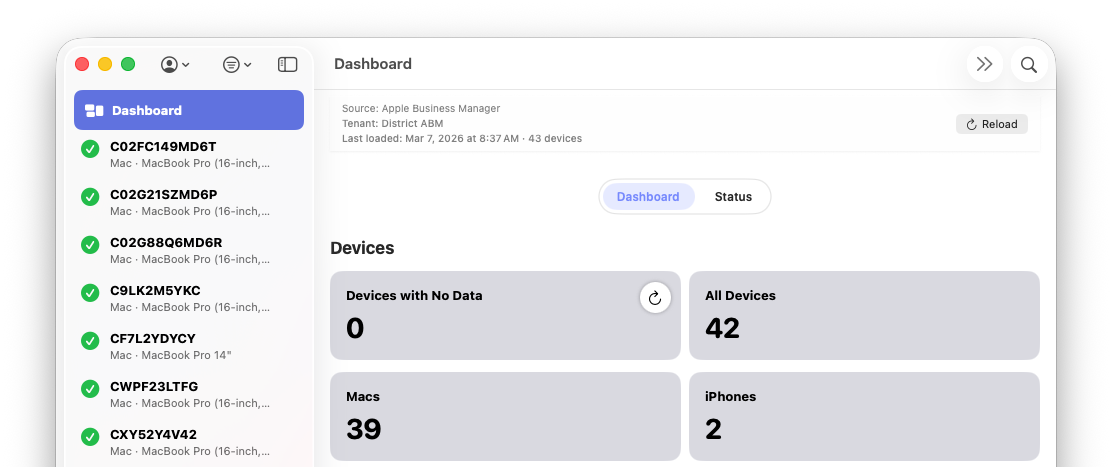
ABM Warranty is a closed source app but there are many open source apps on the market that solve the same problem. Broad Apple Warranty Visibility. Here are some featured open and closed source solutions that are worth checking out!
Filtered posts
Browse posts filed under this category.
rodchristiansen / asbmutil
asbmutil
A swift app and asbmutil CLI for Apple School and Business Manager APIs to get device info, assign or unassign MDM servers, and resolve device-to-s...
Read postneilmartin83 / terraform-provider-axm
terraform-provider-axm
Terraform provider for the Apple Business and School Manager API.
Read postdubprocess / HAM
HAM
HAM is a full-stack hardware asset management tool built for IT teams. It tracks devices across their entire lifecycle — from procurement through r...
Read postkarthikeyan-mac / AxMJamfSync
AxMJamfSync
Sync AppleCare warranty coverage from Apple Business or Apple School Manager (ASM) into Jamf Pro — in four steps, on one Mac.
Read postbriped / AppleBusinessManager
AppleBusinessManager
GitHub repository for AppleBusinessManager.
Read postkarthikeyan-mac / AppleBusinessANDSchoolManagerAPI
AppleBusinessANDSchoolManagerAPI
A complete set of secure, production-ready Python scripts for automating Apple Business and Apple School Manager Device Management APIs. Built for ...
Read postCampusTech / axm2snipe
axm2snipe
Sync devices from Apple Business and Apple School Manager (ASM) into Snipe-IT asset management.
Read postrodchristiansen / asbmutil
asbmutil
Swift CLI for Apple School and Business Manager APIs - get devices info and assign or unassign Device Management Services in bulk.
Read postmicromdm / nanoaxm
nanoaxm
NanoAXM is a set of tools and Go libraries for communicating with the Apple School and Business Manager API.
Read postkaincenteno / pyaxm
pyaxm
Python ABM (Apple Business).
Read postpathaksomesh06 / ABMate
ABMate
ABMate is a native macOS application built with SwiftUI that provides a modern, user-friendly interface for interacting with the Apple Business and...
Read postAndrewMBarnett / ABM-ASM-API-Toolkit
ABM-ASM-API-Toolkit
A script to manage devices in Apple School Manager and Apple Business via the ASM and ABM API.
Read postZeroSegFault / abm-api-helper
abm-api-helper
A tool for interacting with Apple Business and syncing data to Jamf Pro.
Read postAmaranthineTech / AppleBusinessManager-AppleSchoolManager-APIScripts
AppleBusinessManager-AppleSchoolManager-APIScripts
This repository contains scripts used to establish the credentials required for making API calls to Apple School Manager and Apple Business.
Read postkarthikeyan-mac / AppleBusinessManager
AppleBusinessManager
GitHub repository for AppleBusinessManager.
Read postnick-f / axm
axm
Apple Business and School Manager API Ruby gem.
Read postjonbrown21 / Apple-Business-Manager-API-Test
Apple-Business-Manager-API-Test
A playground for attempts to work with the Apple Business API.
Read postdavid-crosby / ABM-API-Tool
ABM-API-Tool
Apple Business API tool in Python 3. Automate device management asset reporting with secure OAuth2 authentication for enterprise macOS environments.
Read postEUCTechTopics / PSABM
PSABM
A PowerShell module to interact with the Apple Business REST API.
Read postFAQ
ABM Warranty uses Apple’s official OAuth 2.0 client flow. You create an EC P-256 private key in Apple Business, then enter the required identifiers in the app. Credentials are stored locally on your Mac and are not sent to third-party services.
Yes. The app is designed for large organizations and includes pagination safeguards, serialized coverage requests, retry handling, and protections for malformed or partial ABM API responses.
No. ABM Warranty is focused on reading and reporting warranty data; it does not modify device records or coverage settings in ABM.
Individual device failures do not stop the overall import. Errors are captured so the app can continue processing remaining devices and you can review failed items later.
Yes. You can export warranty and AppleCare+ coverage data to CSV for audits, lifecycle planning, budgeting, and internal tooling.
Managed preferences allow you to deploy and enforce configuration for ABM Warranty using your MDM, removing the need for manual setup on each device. This is especially useful in enterprise and MSP environments where consistency and control matter.
To use managed preferences, you define the required keys (such as API credentials, certificates, or feature flags) in a configuration profile and deploy it via your MDM solution (e.g., Jamf, Kandji, Mosyle). Once applied, ABM Warranty will automatically detect these managed settings at launch and treat them as authoritative.
If managed preferences are present, the app respects them as read-only. Users cannot override or modify these values locally, ensuring that credentials and configuration remain consistent across all deployed machines.
This approach is ideal for standardized environments where administrators want to centrally control how ABM Warranty is configured and used.
Source: Managed Preferences.
Managed credentials are designed for environments where API access should be centrally controlled and not manually entered by end users.
Instead of adding credentials directly within the app, administrators can deploy them via managed preferences (MDM). Once deployed, ABM Warranty will automatically load and validate these credentials on startup.
Managed credentials are clearly distinguished from manually added credentials within the app. They cannot be edited or deleted by the user, which prevents accidental changes or credential drift.
This is particularly useful for MSPs managing multiple tenants, organizations with strict access controls, and environments where credential rotation and auditing are required.
The app will use these managed credentials just like local ones, but with added safety and enforcement from the management layer.
Source: Multiple Credentials.
The ABM Credential Packager is used to prepare your Apple Business API credentials for deployment via MDM.
Instead of manually distributing raw API keys and certificates, the packager bundles them into a format that can be securely embedded into a configuration profile.
The general workflow is:
1. Export your ABM API key and certificate from Apple Business
2. Use the Credential Packager tool to convert certificates into the required format and bundle credentials into a structured payload
3. Insert the packaged output into your MDM configuration profile
4. Deploy the profile to target devices
Once deployed, ABM Warranty will automatically detect and use these credentials as managed credentials, requiring no user interaction.
This process ensures secure handling of sensitive credentials, consistent deployment across devices, and compatibility with managed preferences. It is the recommended approach for organizations deploying ABM Warranty at scale.